Switching a Word file into a PDF sounds simple, until the formatting shifts, a table breaks apart, or a page number disappears. That kind of frustration is exactly why understanding PDF conversion matters for anyone who works with documents on a regular basis. So, what is PDF conversion? It’s the process of turning a file, like a Word doc, an Excel sheet, or an image, into a PDF, or turning an existing PDF back into an editable format such as Word or Excel. This article covers what PDF conversion means, how it works behind the scenes, why it matters for students and professionals, and what affects the accuracy of the results. We’ll also walk through how to convert a PDF online for free using a browser-based tool like iLovePDFKit, without installing software or creating an account.
Whether you’re a student submitting an assignment, an office professional handling reports, or a freelancer sending invoices, this task comes up more often than most people realize. Getting it right the first time saves you from retyping content or fixing broken tables by hand later.
Key Takeaways
- PDF conversion works in two directions, turning files into PDF or turning PDF files back into editable formats like Word and Excel.
- Common file types involved include Word documents, Excel spreadsheets, PowerPoint slides, and image files like JPG and PNG.
- Conversion quality depends heavily on whether the original document was digitally created or scanned, since scanned files often need OCR (optical character recognition) to extract readable text.
- Free, browser-based tools such as iLovePDFKit remove the cost and installation barriers, letting anyone convert files in seconds without an account.
Table of Contents
- What Is PDF Conversion?
- How Does PDF Conversion Work?
- Why Does PDF Conversion Matter?
- What Affects the Accuracy of a PDF Conversion?
- How Can I Convert a PDF Online for Free?
- The Takeaway
- Frequently Asked Questions
What Is PDF Conversion?
PDF conversion means changing a file from one format into a PDF, or turning a PDF back into an editable format like Word or Excel. It works in two directions, and understanding both helps you pick the right tool for the job. The Portable Document Format, created by Adobe, became the global standard for sharing files because it displays the same way on every device, whether that’s a Windows laptop, a Mac, or a phone. This consistency is exactly why PDF conversion has become such a routine task for so many people. When you convert a file into PDF, you’re locking in its layout, fonts, and images so nothing shifts no matter who opens it. When you convert a PDF into another format, you’re doing the opposite, unlocking a fixed file so you can edit, update, or reuse its content again. Students turn assignments into PDFs for submission, office teams convert reports for distribution, and freelancers use both directions daily to handle invoices, contracts, and proposals. Because PDF conversion touches so many everyday tasks, from academic work to financial reporting, knowing how it functions saves time and avoids formatting headaches down the road.
Converting Files Into PDF vs. Converting PDF Into Other Formats
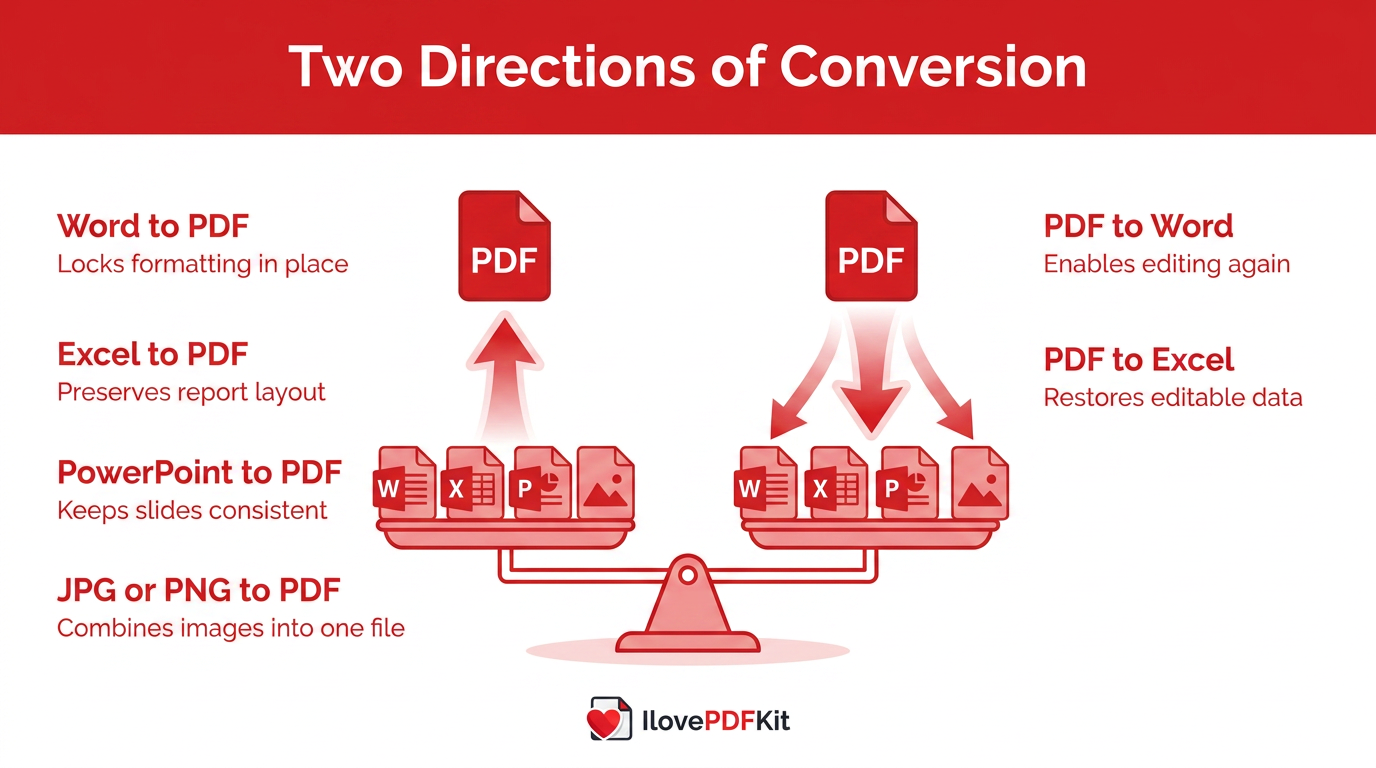
Converting files into PDF covers everyday tasks like turning a Word résumé into a polished PDF, saving an Excel budget as a PDF report, or combining scanned receipts and JPG photos into one shareable document. PowerPoint decks also convert to PDF often, so slides display the same way no matter what software opens them. This direction is really about locking formatting in place before you send a file out into the world.
Going the other way means turning a fixed PDF back into something you can edit. Maybe you need to update numbers in an old Excel report, revise a Word contract, or pull slides out of a PDF and back into PowerPoint. Tools like iLovePDFKit’s Office-to-PDF, PDF-to-Office, and Image-to-PDF converters handle both directions right from a browser, similar to documented conversion workflows used by enterprise document processing platforms, so you don’t need separate software for each format.
| Direction | Example Conversions |
|---|---|
| Converting To PDF | Word to PDF, Excel to PDF, PowerPoint to PDF, JPG or PNG to PDF |
| Converting From PDF | PDF to Word, PDF to Excel, PDF to PowerPoint, PDF to JPG |
How Does PDF Conversion Work?
PDF conversion works by reading a file’s internal structure, not just copying what it looks like on screen. A quality converter scans the fonts, tables, column alignment, and embedded images inside a Word doc, spreadsheet, or PDF, then rebuilds that same structure in the new format, a challenge tackled by dedicated PDF-to-Markdown extraction pipelines built specifically to preserve scientific document layout. This is very different from taking a screenshot or copying and pasting text, which usually breaks tables and drops formatting entirely.
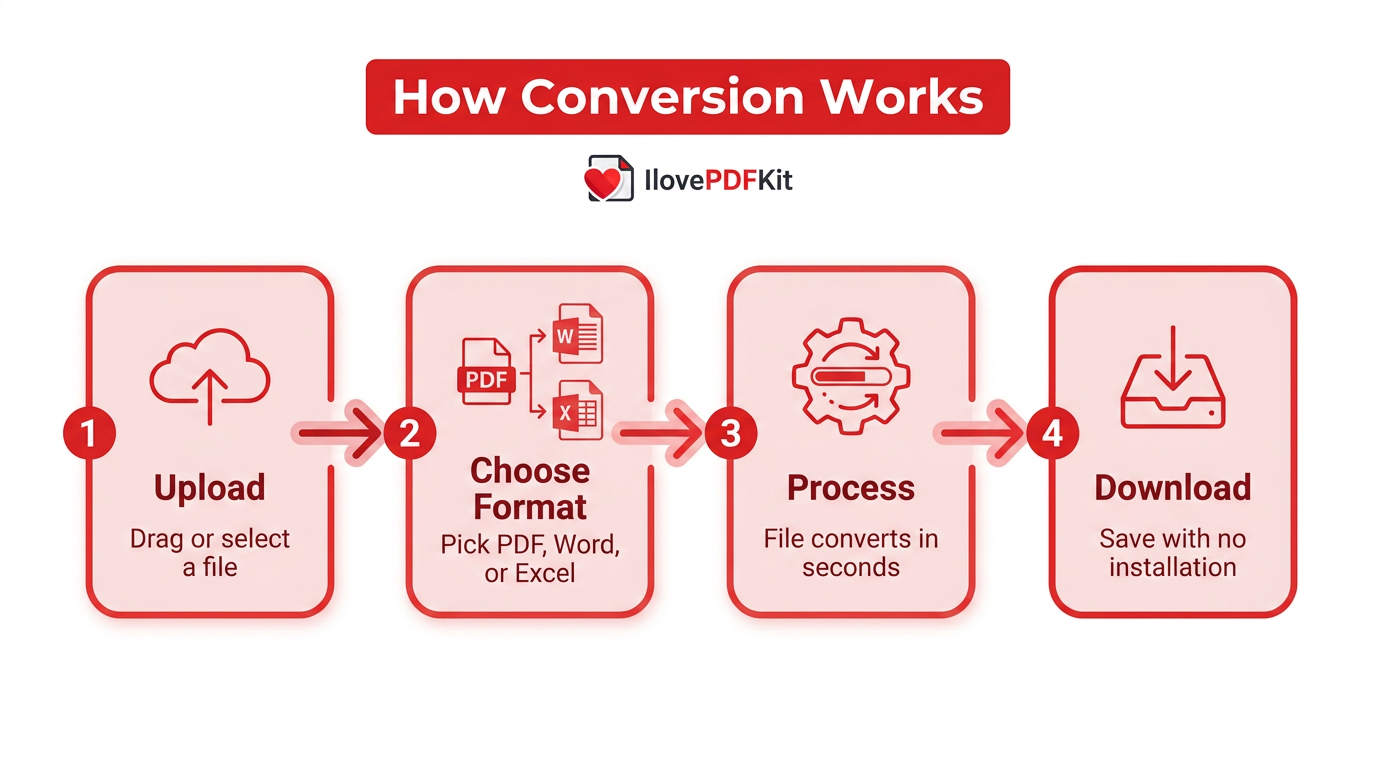
Most online tools follow the same simple pattern:
- Upload: Drag a file into the converter, or select it from your device.
- Choose format: Pick the format you want, whether that’s PDF, Word, or Excel.
- Process: The tool converts the file within seconds.
- Download: Save the finished file straight to your device, with no software installation required.
The whole process works the same way on Windows, Mac, Linux, or a phone.
Why Does PDF Conversion Matter?
PDF conversion matters because it keeps a document looking exactly the same no matter who opens it or what device they use. A Word file might shift fonts or spacing between different computers, but a converted PDF holds its layout in place, which is why resumes, contracts, and academic papers usually get shared as PDFs. Conversion also tends to shrink file size, making documents faster to email, upload, or store in cloud folders.
Converting a PDF back into Word or Excel matters just as much, since it saves you from retyping content from scratch. A finance team can pull numbers out of an old invoice PDF straight into a spreadsheet, and a legal team can turn a contract back into Word to track revisions. That kind of reuse is often the real reason PDF conversion has become part of daily work for students, freelancers, and office staff alike.
What Affects the Accuracy of a PDF Conversion?
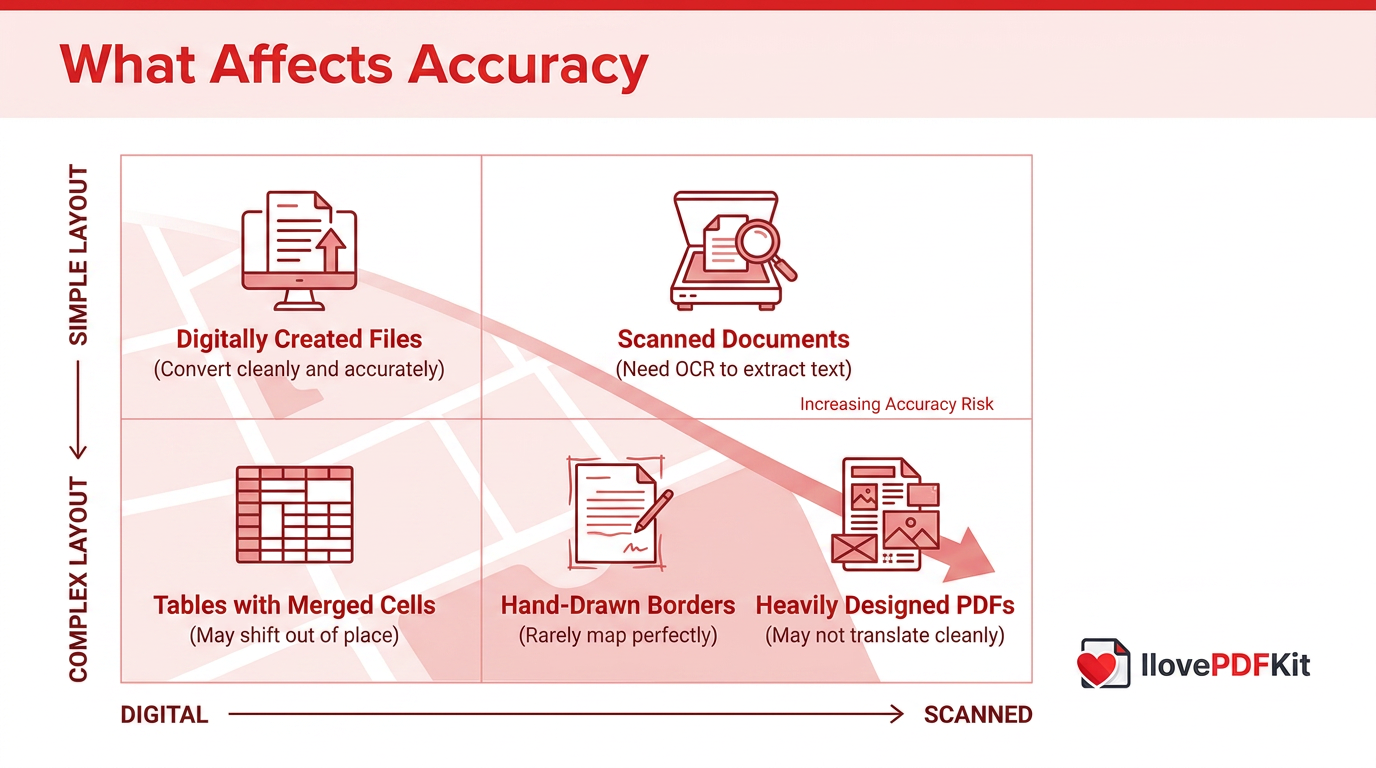
The accuracy of a PDF conversion depends mostly on how the original file was created. A PDF exported directly from a Word doc or Excel sheet converts back cleanly because the text and structure are already digital and machine-readable. Scanned documents behave differently, since they’re really just images of text, so they often need optical character recognition, a technology explored in depth in recent research on knowledge and information extraction from PDF documents that reads scanned text and turns it back into editable words.
Complex layouts also affect the outcome:
- Tables with merged cells or uneven spacing sometimes shift out of place once converted to Excel.
- Hand-drawn borders and irregular grids rarely map perfectly onto a new format.
- Heavily designed PDFs with multiple columns or graphics may not translate cleanly into PowerPoint.
In these cases, a quick manual check after conversion usually catches anything that needs a small fix.
How Can I Convert a PDF Online for Free?
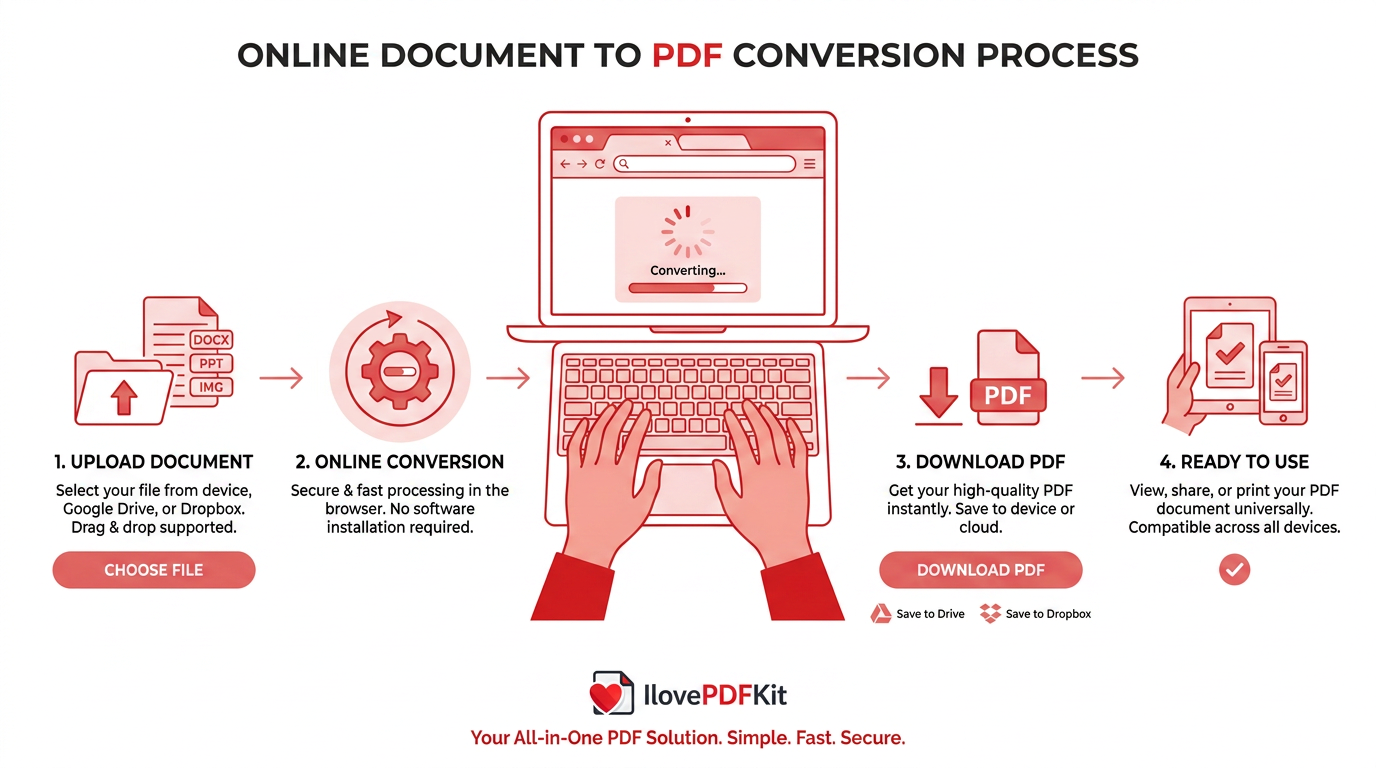
Converting a PDF online for free simply means using a browser-based tool instead of installing desktop software or paying for a subscription. iLovePDFKit works this way, letting you convert Word, Excel, PowerPoint, and image files to and from PDF directly in your browser, without creating an account or entering payment details. You just upload your file, choose the format you need, and download the result within seconds.
The platform focuses on pixel-perfect formatting accuracy, so fonts, tables, and images come out looking the way they should, without the broken layouts that generic converters sometimes produce. Files are processed over a secure connection in real time and removed from the server after conversion, which matters if you’re handling a client contract, invoice, or grade report. That combination of speed, accuracy, and privacy is what makes free browser-based conversion practical for everyday use.
Tip: Before uploading anything confidential, check that a converter processes files over an encrypted connection and removes them automatically afterward.
The Takeaway
PDF conversion, at its core, moves content between two states, a fixed PDF that looks the same everywhere and an editable file you can update whenever you need to. Whether you’re turning a Word report into a polished PDF or pulling a contract back into an editable format, the right tool preserves your formatting instead of forcing you to rebuild it by hand.
Free, browser-based tools like iLovePDFKit make this process quick and accessible, whether you’re a student finishing an assignment, an office worker prepping a report, or a freelancer sending an invoice. There’s no software to install and no account required, just an upload, a format choice, and a finished file in seconds. Next time you need to switch a document’s format, give it a try before reaching for anything more complicated.
Frequently Asked Questions
Can I Convert Multiple PDF Files at the Same Time?
Basic free tools usually handle one file at a time, which covers most everyday needs like a single report or invoice. Batch conversion, converting many files in one pass, is typically a paid or premium feature, useful mainly for businesses managing large document archives.
How Long Do Online Converters Keep My Uploaded Files?
Reputable services delete uploaded files automatically within a few hours of processing, which reduces the risk of data exposure. The platform uses real-time secure processing and removes files from its servers after conversion, so your documents don’t sit online indefinitely.
Will My PDF-to-Word or PDF-to-Excel Conversion Always Look Perfect?
Not always. Text-based PDFs, the kind created directly from Word or Excel, usually convert cleanly with little cleanup needed. Scanned documents or PDFs with complex tables and merged cells may need small manual touch-ups afterward to fix alignment or spacing.
Do I Need to Create an Account to Convert a PDF?
No, most reputable tools don’t require sign-up for full functionality. Browser-based converters let you upload, convert, and download files directly without entering an email address or creating a password first.
Is It Safe to Convert Sensitive Documents Like Contracts or Invoices Online?
Yes, as long as the service uses encryption during transfer and deletes files automatically afterward. Look for 256-bit SSL encryption and a clear policy on automatic file removal before uploading anything confidential, like contracts or financial statements.
What’s the Difference Between Converting to PDF and Converting From PDF?
Converting to PDF locks a file’s formatting in place so it displays the same everywhere. Converting from PDF does the opposite, turning a fixed PDF back into an editable format like Word or Excel so you can make changes again.
